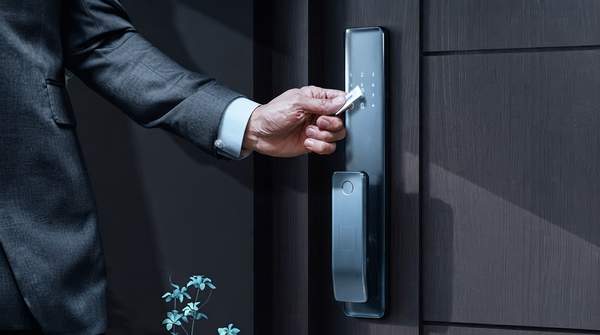
A smart lock is an electromechanical device that locks and unlocks a door when it receives an authorized digital instruction, replacing the physical key with cryptographic credentials sent over a wireless signal. The bolt itself is usually unchanged—Ajax Systems describes the typical design as a steel deadbolt triggered by electronics rather than a metal key. What actually differentiates smart locks, and what should drive your purchase decision, is the combination of three things: how the lock authenticates you, how it communicates, and whether its security depends on your internet connection. Each choice trades convenience against security and reliability in measurable ways.
The Core Mechanics and Electronics of Smart Locks
Every consumer smart lock, regardless of brand, is built from three main components: a mechanical part, a motor, and a wireless transceiver. The mechanical portion is the familiar deadbolt that physically secures the doorframe. The motor is what retracts and extends that bolt when access is authorized, doing the work your hand used to do with a key. The transceiver is the radio that receives and verifies instructions from a keypad, phone, biometric sensor, or access card.
The critical conceptual shift is that the "key" has become digital. Instead of matching the cuts on a metal key to pin tumblers, the lock matches cryptographic keys transmitted via wireless signals. Wikipedia's overview defines the category as locks that act on prompts from an electronic keypad, biometric sensor, access card, or a registered mobile device over Bluetooth or Wi-Fi. Because the lock is battery-powered, all of this happens on stored energy, which is why power management shapes so many design decisions downstream.
Authentication Methods: Balancing Convenience and Security
How you prove your identity to the lock is the single biggest convenience decision. Keypad locks require a PIN code, which Ajax notes is ideal for children who don't yet have smartphones. Smartphone apps unlock via a wireless handshake. Biometric locks use a sensor to verify a fingerprint or, in some designs, a palm vein pattern. Most locks also retain a physical key cylinder as an override.
Each method carries a distinct risk profile. PIN codes can be shared instantly with guests and workers—but they can also be observed, guessed, or simply handed to too many people. Biometrics offer more security than passwords alone, as Wikipedia's contributors note, because a fingerprint can't be texted to a stranger. Lockin's technical guide adds an important nuance: local biometric matching on the device does not automatically protect every network message or cloud account connected to the lock. The authentication method and the communication channel are separate security questions, and a purchase decision should evaluate both.
Smart Lock Authentication Methods: A Comparative Framework
The table below compares the common ways of unlocking a smart lock across convenience, security considerations, and operational dependencies, so you can match a method—or a combination—to your household's needs and risk tolerance.
| Method | Convenience | Security Consideration | Key Dependency |
|---|---|---|---|
| Keypad (PIN code) | Codes can be shared instantly with family, guests, and workers; works for children without phones | Codes can be shared too easily; vulnerable to observation or guessing if not managed securely | None—works without a phone or internet on most models |
| Smartphone app (Bluetooth) | Hands-free unlocking when in range; straightforward setup with no hub | Short-range connection limits attack surface; verifies encryption keys at both ends | Requires proximity to the lock and a charged smartphone |
| Smartphone app (Wi-Fi) | Maximum convenience—remote lock and unlock from anywhere with internet | Relies on network stability and cloud security; battery drains faster | Requires home internet and account access for remote features |
| Biometrics (fingerprint/palm vein) | Fast, personal, nothing to carry or remember | Local processing of biometric data is often preferred for privacy; requires careful setup and reliable sensor performance | None for entry itself; sensor and power must work |
| Physical key backup | Low—only used as an override | Preserves a traditional picking surface, but provides a failsafe | Essential during power outages or electronic failure |
The framework's practical value is in combinations. A household with young children, remote workers needing guest access, and a spotty router might reasonably choose a keypad-plus-Bluetooth model with a key backup, while a frequent traveler who wants to let a dog-walker in midday would lean toward Wi-Fi with time-limited digital codes.
Connectivity: Wi-Fi vs. Bluetooth Trade-offs
The communication protocol determines what the lock can do and how often you'll change its batteries. Bluetooth Low Energy creates short-range connections with keyfobs or smartphones; when in range, an authorized device communicates with the lock's radio module to verify encryption keys at both ends, as Lockin's guide explains. Wi-Fi connects the lock to your home network, letting you lock or unlock the door from anywhere with an internet connection, and enabling voice-assistant pairing and, on some models, real-time audio or video monitoring, according to eufy's product guide.
The trade-off is power. Wi-Fi offers speed and long-range capability but drains battery life faster than Bluetooth or Zigbee, meaning a Wi-Fi lock may need more frequent battery replacement, as Simpled's comparison puts it. Lockly states the same directly: Wi-Fi smart locks run their batteries down more quickly than Bluetooth models. ADT notes its locks run on four AA batteries with low-battery notifications—a reminder that every smart lock is a power-budgeted device. Wi-Fi also introduces setup dependencies: one manufacturer's account describes a buyer who couldn't complete Wi-Fi setup because of a weak router signal at the front door, requiring router relocation. Bluetooth models are simpler to set up and need no hub, but they confine control to short range unless paired with a bridging device.
Layers of Smart Lock Security: Physical, Digital, and Operational
A smart lock's security is layered, and each layer answers a different threat. The physical layer is the deadbolt and its resistance to kicking, picking, or drilling—Ajax argues it is generally much harder to hack a high-quality smart lock than to kick down a door or pick a standard pin tumbler lock. The digital layer is encryption: smart locks use cryptographic standards to protect communications between your phone and the lock, with Ajax citing AES, the same standard used in online banking, and ADT specifying 128-bit encryption on its locks.
The operational layer is where buyers most often go wrong. Encryption secures signals against eavesdropping and tampering, but its effectiveness depends on proper implementation and key management—an encryption term on a spec sheet is not a complete attack-test result, as Lockin cautions. Vivint recommends strong access codes, updated firmware, and two-factor authentication as the practical steps that significantly reduce risk. Yale's overview adds that manufacturers have added tamper-resistant designs and multi-factor authentication in response to evolving threats. No digital device is entirely immune to interference, so the honest comparison is not "hackable versus unhackable" but how a given model's layers stack up against the physical alternative.
The Role of Physical Key Backups and Offline Functionality
Reliability is the dimension marketing pages mention least. Most smart locks can still be operated using the keypad or a physical key backup even without Wi-Fi, as Vivint's FAQ confirms—only remote access and notifications require an internet connection. Lockin's guidance is more granular: an already-configured local credential may remain usable while internet-dependent features are down, provided the lock has power and the specific model supports that local method. If the battery is depleted, you follow that model's documented backup-entry procedure.
This distinction between local and cloud-dependent security matters for both resilience and privacy. A lock that authenticates locally keeps working through network outages and reduces reliance on cloud services for core security—but local operation does not protect the remote-access features that travel through the cloud. When a purchase depends on an undocumented security capability, Lockin advises asking for model-specific documentation rather than assuming a generic description proves it.
Choosing Your Smart Lock: Balancing Needs and Risks
When selecting a smart lock, prioritize authentication methods and connectivity options that align with your specific needs for convenience, security, and resilience against power or network failures. Concretely: choose Bluetooth or keypad entry if battery life and simplicity dominate, Wi-Fi if remote control justifies faster battery drain and cloud dependence, and always confirm the physical key backup and documented offline behavior before buying. The measurable indicator of a good choice is straightforward: the chosen smart lock reliably performs its core locking and unlocking functions under various conditions—an internet outage, a low battery—and its security features are regularly updated by the manufacturer. If a model's documentation can't support that test, that itself is your answer.
Sources
- How smart locks work — Ajax Systems
- Smart lock - Wikipedia — EN
- How Do Smart Locks Work? A Comprehensive Guide to Their Mechanisms — Lockin
- Wifi vs Bluetooth Smart Lock - Which is the Best for You? - eufy US - eufy
- What Are Bluetooth, Zigbee, and Wi-Fi? — Simpled
- Bluetooth vs. Wi-Fi Smart Locks: Which Is Best for You? — Lockly
- ADT
- How Do Smart Locks Work? — Vivint