A photography or design portfolio usually asks someone to move down a page, open a project and continue to the next one. That format can present the work cleanly, but it gives the creator relatively little control over the space between projects, the order in which different bodies of work become visible or the sense of scale surrounding individual pieces.
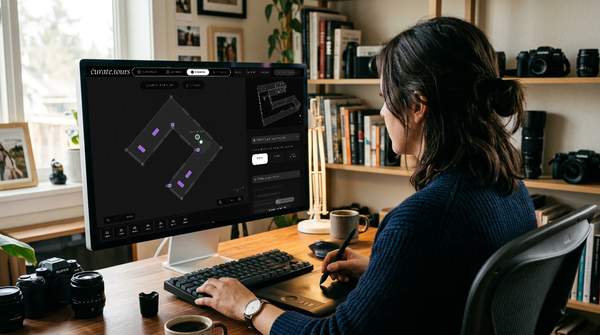
curate.tours offers another format. The browser-based platform supports 3D photography portfolios and interactive design exhibitions, giving creators tools to build custom floorplans, place high-resolution work inside them, stage the environment and share the completed space through an online entry link.
Turn a Portfolio Into a Place
A spatial portfolio changes the basic unit of presentation. Instead of arranging only pages or thumbnails, you can arrange walls, rooms and the relationships between the work placed inside them.
For a photographer, that might mean giving separate series their own areas rather than presenting every image in one continuous stream. For a designer, different rooms can separate disciplines, projects or stages of a practice while still keeping them inside one connected presentation.
That extra dimension creates another editorial choice. You are deciding not only what belongs in the portfolio, but how someone moves from one body of work to the next.
Give Photography Series Their Own Rhythm
Photographic work often gains meaning from sequencing. The image before or after another photograph can change what the viewer notices, while spacing can determine whether a series feels compressed, expansive or deliberately interrupted.
A custom floorplan gives those decisions a physical counterpart. A long wall can carry a tightly related sequence, while another room can introduce a different subject, period or visual language without breaking the portfolio into separate web pages.
Distance also becomes useful. A larger image can occupy a wall on its own, while smaller works can be grouped more closely when the relationship between them deserves attention.
The result is still a digital portfolio, but the visitor encounters the photography through movement and spatial relationships rather than through scrolling alone.
Let Different Design Projects Occupy Different Spaces
Design portfolios often need to accommodate work that behaves differently on screen. Branding, illustration, product concepts, visual research and other project types may belong to the same practice while requiring very different amounts of space and context.
With curate.tours, creators can use a custom 3D environment to give those projects separate visual territories. One section might present a concentrated series of images, while another can use a larger room to create distance between individual pieces.
This can be especially useful when the portfolio itself needs an organising idea. Rather than forcing every project into an identical page structure, the architecture can signal when the visitor has moved into another part of the creator’s work.
Make Scale Part of the Presentation
A flat portfolio can tell someone the dimensions of a photograph or design piece, but dimensions on a screen remain abstract. Placing work within a three-dimensional room gives it a surrounding environment that can help communicate relative scale.
curate.tours allows high-resolution works to be mounted within a custom gallery space. That relationship between artwork and architecture gives creators another way to decide whether a piece should dominate a wall, sit within a group or appear as part of a larger sequence.
Scale does not need to become theatrical to be useful. Sometimes the strongest choice is simply giving one piece enough room to stand apart before the visitor continues towards the next project.
Use the Environment Without Turning It Into the Main Event
A portfolio needs presentation, but the presentation should still serve the work. curate.tours supports 3D pedestals, furniture and atmospheric lighting, giving creators the option to develop the environment around their photography or design projects.
Those tools can establish visual character without requiring every room to be heavily styled. Lighting may help separate one portfolio section from another, while carefully chosen furniture or staging elements can give a room scale and structure.
Restraint remains useful. When the work already carries strong colour, texture or visual complexity, a quieter environment can give it space rather than competing for attention.
What Spatial Presentation Adds to Different Portfolios
The same 3D format can serve photography and design in different ways:
- Photography: sequence series across walls and rooms, create pauses between bodies of work and use distance to change how individual images are encountered.
- Design: separate different project types, organise a broader practice spatially and give each body of work an environment suited to its presentation.
Neither use case requires every portfolio to behave like a traditional physical gallery. The advantage is having another set of presentation choices available when a conventional page does not express the relationships between the work as well as you want it to.
Build Around the Way You Want Work to Be Encountered
Starting with the floorplan encourages a different kind of portfolio edit. Instead of asking only which images should make the final selection, you can also decide which projects deserve their own room, where transitions should happen and what a visitor should notice from one area before entering the next.
That can make the editing process more deliberate. A project that initially seemed essential may feel repetitive once it occupies physical space beside similar work, while another may become a useful bridge between sections.
The architecture can change as those decisions develop. Because curate.tours provides custom vector floorplans, the structure can respond to the portfolio rather than forcing the portfolio into a predetermined room.
Share One Experience Instead of a Folder of Projects
Once the portfolio is ready, curate.tours lets creators publish and share the virtual space through an online entry link. The person receiving the portfolio enters the exhibition rather than opening a collection of disconnected files.
That can be useful when presentation itself forms part of the impression you want to make. The portfolio has a beginning, spatial relationships between projects and an environment that reflects how you chose to organise the work.
It also gives photographers and designers a format that can sit alongside an existing website rather than requiring every piece of professional information to live inside the 3D space. The exhibition can concentrate on the visual work and the experience of encountering it.
Keep the Portfolio Focused on the Work
The most useful spatial portfolio is not necessarily the largest one. Extra rooms, staging and lighting only earn their place when they support the work or make the organisation easier to understand.
A focused photography exhibition might need only a few carefully sequenced spaces. A designer with several distinct disciplines may benefit from a broader structure that lets each body of work establish its own identity.
curate.tours provides the spatial tools, but the creator still makes the editorial decisions. That balance is what makes the format useful for a portfolio: the technology creates room for presentation choices without deciding what the work should say.
Frequently Asked Questions
Can photographers use curate.tours for an online portfolio?
Yes. curate.tours explicitly supports 3D photography portfolios alongside virtual art galleries and design showcases. Photographers can arrange high-resolution work within custom 3D spaces and share the finished portfolio through an online entry link.
Can designers build interactive showcases with curate.tours?
Yes. curate.tours supports interactive design portfolios as part of its virtual exhibition platform. Designers can use custom floorplans, artwork placement, 3D staging and lighting to organise different projects within one navigable presentation.
Do you need coding to create a portfolio with curate.tours?
No. curate.tours is built for browser-based creation without requiring you to write code. The workflow focuses on designing the space, placing the work and preparing the exhibition for online sharing.
Can a curate.tours portfolio be shared with other people?
Yes. curate.tours allows completed exhibitions and portfolios to be shared through an online entry link. This gives visitors access to the 3D presentation without requiring the portfolio to be reduced to a sequence of static images.
Give Your Portfolio More Room to Communicate
Photography and design portfolios already depend on selection, sequence and presentation. A three-dimensional format adds space to those decisions, letting walls, rooms, distance and atmosphere contribute to how individual projects relate to one another.
Build your 3D portfolio exhibition with curate.tours and shape a presentation around the work you want people to encounter.